Which product photos work best for drama ads?
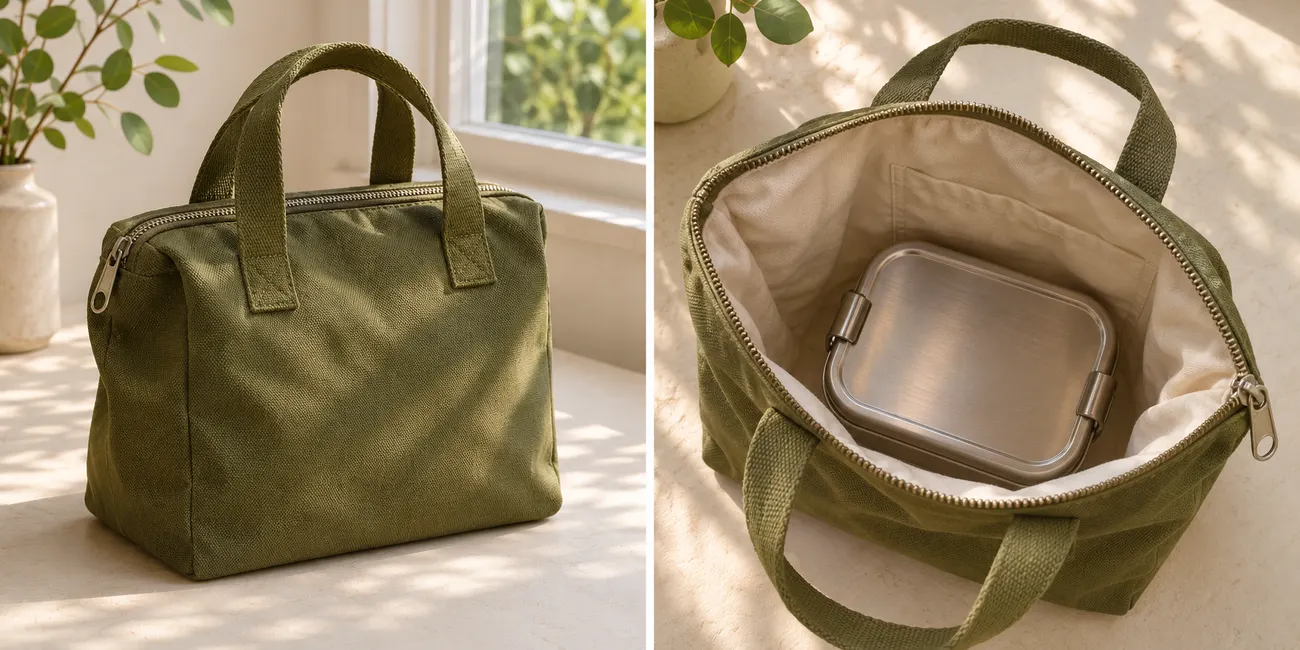
If you could send the person drawing your storyboard just one photo, send the one you’d show a customer who asked, “Which bag am I getting?” For an olive canvas lunch bag, that might be a view from one corner with the handles up and the zip closed. Start there. A second photo earns its place when someone opens, wears, turns or takes something out of the product on camera.
Give the whole bag the first shot
Suppose your favorite photo shows the bag on a picnic blanket with peaches, two plates and a paperback. Shrink it to the size of a phone thumbnail. If the first thing you see is a peach, keep the picture for the conversation about styling. Someone trying to draw the bag still needs to know how tall it is, how deep the base is and where the handles meet the canvas.
You can take that picture on a kitchen counter. Turn the bag until you can see the front and one side. Set it down the way it sits when packed for lunch. Look along the edges before taking the photo. A handle folded behind the bag can make two short handles look like a single shoulder strap. Lift it into place, step back far enough to include the base, and take the shot again.
Let the scene choose the second angle
The same lunch bag could star in a few different drama ads. Imagine it arriving at an office lunch like a guest of honor. Someone pulls out the chair at the head of the table. The bag sits there while everyone waits for it to speak. The closed view gives the storyboard artist enough to stage the entire joke. You could take a dozen pictures of the lining and none of them would change a frame.
Change the ending. This time a colleague unzips the bag and lifts out a metal lunch tin. From the first photo, the person setting up the shot has to guess which way the tin fits and where a hand can reach it. Pack the actual tin, pull the zip back as far as it will go and photograph the opening from above. Someone can now use the second picture to reset the bag between takes.
There’s a reason to take a third picture if the zip itself gets a close-up. Try the move with your hand where it will be on camera. If your fingers cover the pull, change the angle until you can see how they catch it. If the script cuts straight from the closed bag to the open one, those two wider photos already cover the cut.
Keep one version of the product in every frame
It’s tempting to borrow an interior shot from an older listing. Compare the details at the opening first. A cream lining in a bag with the same olive exterior can slip past you on a contact sheet. On screen, someone unzips one bag and appears to reach into another. This matters for small goods too. The boardroom coffee mug example shows how much of the mug’s identity is in its rim and handle.
Open the signed-in product photo workspace and add the whole-product view first. DramaAds marks that upload Main image. Add any other angles as separate files. The workspace accepts up to three still JPG, PNG or WebP images, up to 10 MB each.
Read your planned action aloud with the photos open on your phone. For “unzip the bag and lift out the tin,” you should be able to point to the zip in one photo and the tin in the other. If you can do that, put the camera away. You have the views this scene needs.
Once you’ve picked the main view, try that photo in Ad Studio. As you read the scripts, look for a scene you could stage with the details already visible in the picture.